
Timestamp Camera
Bian DiPhotography
4.63.68K Reviews
- Version
- Varies With Device
- Installs
- 50.00M
- Age Rating
- Everyone
Screenshots
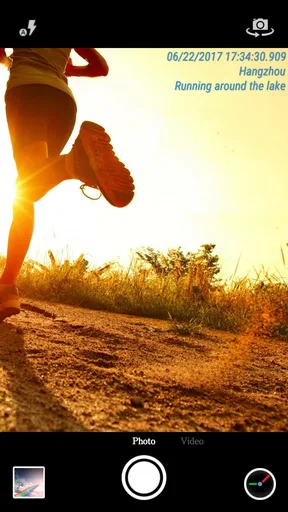
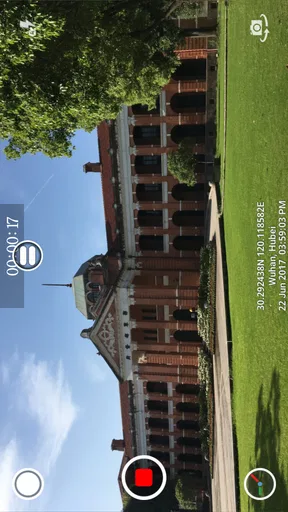
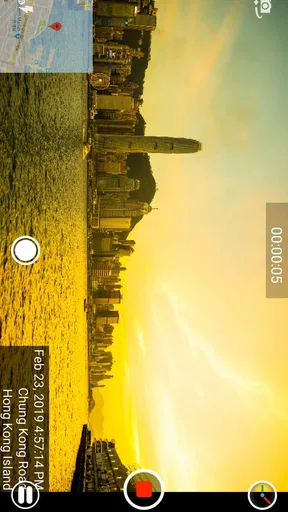
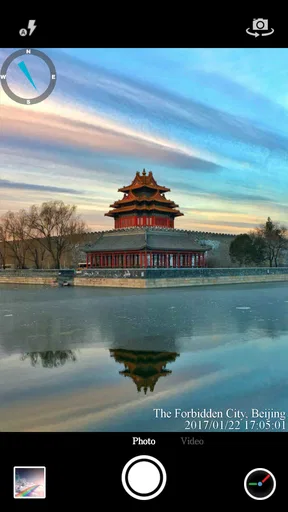
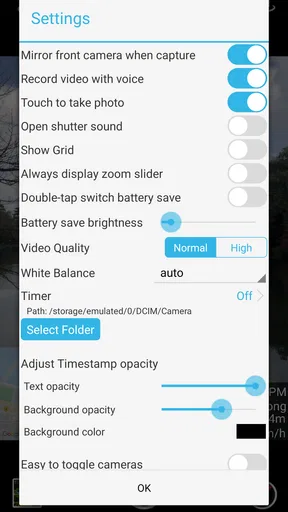
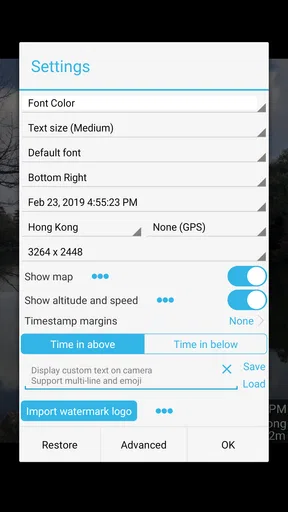
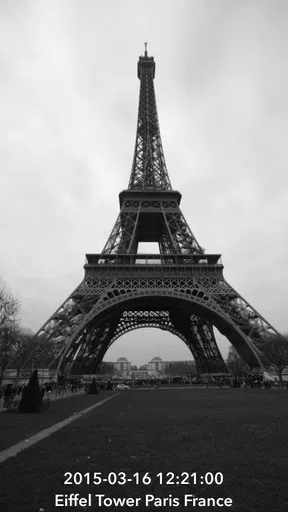
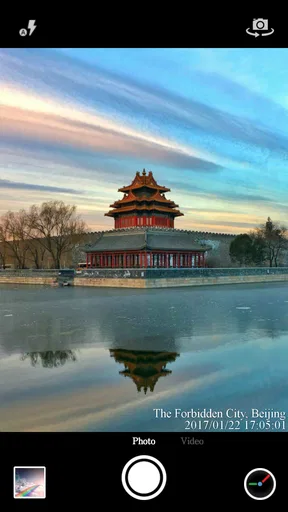
Our Review of Timestamp Camera
 Analysis by Appyee
I find Timestamp Camera most useful when a photo needs to prove when it was taken rather than simply look attractive. It is a photography app from Bian Di that places date and time information directly on photos and videos while you capture them. That sounds narrow, and it is, but the narrow purpose is also its main strength: instead of taking an ordinary picture and adding a label later, I can create a visibly marked record at the moment of capture.
My overall view is straightforward. This is a practical tool for people who document work, deliveries, travel, property conditions, events, or personal routines. It is not the app I would choose for artistic photography, polished social posts, or detailed editing. The free price makes it easy to try, and its Everyone age rating keeps the audience broad, but the usefulness depends heavily on whether a visible timestamp fits your workflow.
What makes Timestamp Camera useful in real situations
The app belongs to the photography category, but I think of it more as a documentation tool than a creative camera. Its central job is to add date and time watermarks to photos and videos. That distinction matters because the watermark becomes part of the captured image. You are not merely storing capture information somewhere in the file; you are creating an image that communicates its timing whenever somebody views or shares it.
That is particularly handy when the recipient will not open the original photo details. Imagine photographing the condition of a rented room before moving in, recording a meter reading, showing a parcel at the moment of delivery, or documenting progress on a repair. A regular camera may preserve technical metadata, but that information can be hidden, stripped during sharing, or overlooked. A visible mark is much easier for another person to understand immediately.
I also see value in short videos. A video showing a site visit, a completed task, or a changing outdoor condition can be easier to organize when the date and time remain visible throughout the recording. The result is less elegant than a clean clip, yet it can be more useful as a straightforward record. For practical communication, clarity often matters more than presentation.
The app has attracted a large audience: it has passed 50 million installs and holds a 4.6 average from around 419 thousand ratings. Those figures do not guarantee that it will suit everyone, but they do make sense when I consider how many small situations benefit from a quick, visible record. It is free, and Bian Di has kept the concept accessible rather than turning it into a complicated professional camera system.
A simple workflow that saves a later editing step
The most important advantage is the timing of the watermark. With a conventional camera, I would normally capture an image first, open an editor, add text, position it, export a copy, and then remember which version is the final one. That process is manageable for one picture and irritating for a sequence of images. Timestamp Camera moves the identifying step into the capture process, which is useful when I need a batch of consistent records.
For example, if I were checking several rooms in a building, I could photograph the entrance, walls, fixtures, and meters as I moved through the property. The visible date and time give every image immediate context. I would still organize the files afterward, but I would not need to reconstruct when each picture was made by comparing filenames or browsing through a gallery.
There is a less obvious benefit here: the watermark can reduce confusion when images are sent through a group chat or collected from several people. A clean photo often loses its surrounding explanation once it leaves the original conversation. A marked photo carries one piece of that context with it. That does not make it formal evidence by itself, but it can make everyday records far easier to sort.
For repeated work, consistency is more important than decoration. I would choose a restrained placement and keep it stable across a set of images rather than changing the appearance from shot to shot. The goal is not to make the watermark noticeable for its own sake; the goal is to make it readable without covering the object being documented.
Where it beats ordinary camera apps and editors
A standard camera app is usually better for general photography. It may offer a cleaner interface, stronger exposure controls, or a more polished preview. It also leaves the image free of text, which is exactly what most people want for portraits, food, landscapes, and social media. If my priority were image quality and composition, I would start with the phone’s built-in camera.
An editing app is more flexible after capture. I can add a custom caption, change the type style, place a label precisely, or design a complete graphic. That flexibility is valuable when I am preparing a presentation or publishing content. The trade-off is time and consistency. Editing later means I have to remember to do it, and it creates more opportunities to mark the wrong file or forget one image in a series.
Timestamp Camera sits between those options. It is more purpose-built than a normal camera and less elaborate than a full editor. I would choose it when the date and time are part of the image’s practical meaning. I would not choose it merely because every photo needs text. That would add visual clutter without solving a real problem.
Another important trade-off is permanence. A watermark captured into the image cannot be cleanly moved or hidden afterward without editing. This is excellent when I want the context to travel with the file, but inconvenient when I later decide that I want a clean version. My advice is to use the app for records where the mark is genuinely useful, and keep a regular camera for images that may later be printed, framed, or heavily edited.
Small workflow decisions that make a big difference
One practical tip is to decide the watermark position before beginning a series. A corner may work for a landscape, while the same corner could cover a serial number, a crack, a label, or a person’s face in a close-up. I would take a quick test image first, inspect whether the text competes with the subject, and then continue. That short check prevents an entire batch from becoming harder to read.
A second tip is to think about the viewing environment. A timestamp that looks clear on a bright phone screen may be less readable when a picture is printed or viewed in a compressed messaging preview. For records that another person will inspect quickly, legibility should come before a stylish appearance. I would also avoid placing important details too close to the edge, where cropping or different screen proportions could reduce clarity.
A third insight concerns sequences. If I am recording a process, I would capture a few wider establishing images before moving to close details. The timestamp helps with order, but it does not explain location or subject on its own. A wide shot, followed by detail shots, creates a much more understandable record than a long run of nearly identical close-ups.
There is also a useful distinction between a timestamp and proof. A visible date and time can support a personal record, but it should not be treated as an independent guarantee that an image is authentic or unchanged. For serious disputes, I would preserve the original files and keep the surrounding documentation as well. The app helps communicate when a capture was made; it does not replace careful record-keeping.
Where the app falls short
The same directness that makes the app convenient can make it feel limited beside a full camera or editor. If I want to correct a composition, build a visual style, retouch a portrait, or create a clean final image, I would need another tool. Timestamp Camera solves one problem well, but it is not designed to become the center of an entire photography workflow.
The watermark itself can be distracting. In a casual record, that is usually acceptable. In a photo intended for a portfolio, a family album, or a polished post, it can compete with the subject and make the result look less finished. I would be especially cautious with portraits and scenic images, where a permanent label can interrupt the visual balance.
There is a second kind of friction: the app encourages me to think about documentation while I am taking the picture. That is helpful for work, but it can slow down spontaneous photography. When a moment happens quickly, I would rather use the camera that opens fastest and decide later whether any context needs to be added. A dedicated timestamp camera is most comfortable when I know in advance that every capture needs the same kind of marking.
It is also worth remembering that a visible time label is only as useful as the device’s time setting. If the phone clock is wrong, the displayed information will be wrong too. Before relying on the app for a scheduled inspection or a time-sensitive record, I would check the phone’s date, time, and time zone. That is not a special flaw in this application; it is simply an important practical condition for any camera that displays the device’s clock.
Privacy deserves some thought as well. A timestamp can reveal more than the creator intended when an image is shared publicly, especially if the date and time help identify when a person was at a particular place. For private work records, that may be exactly what is needed. For public posts, I would consider whether the visible information adds value or unnecessarily exposes a routine.
Who should use it, and who should skip it
I would recommend Timestamp Camera to contractors, inspectors, delivery workers, landlords, tenants, field workers, travelers keeping a visual diary, and anyone who regularly sends photos as evidence of progress or condition. It can also help families organizing a long event or a renovation, because the markings make a large collection easier to understand later.
It is a good fit for someone who wants a quick answer to the question, “When was this taken?” without relying on a separate gallery view. It is also suitable for people who dislike repetitive post-processing. The free price removes the main barrier to testing it, and the Everyone content rating makes it appropriate for a broad range of users.
I would suggest skipping it if you mainly take creative photos, care about an uncluttered frame, or already have a carefully designed editing workflow. A photographer who wants full control over typography, layout, and retouching will probably be happier adding information later. Someone who only needs occasional date context may also find the regular camera’s file details sufficient.
The app has been available since March 26, 2015, which helps explain why its appeal is practical rather than novelty-driven. It is an established idea with a clear purpose, not a social network or an all-in-one photo studio. That focus is reassuring for a user who wants a dedicated utility, but it also means I would not expect it to replace the broader tools already on a phone.
Questions I would settle before relying on it
If you are wondering whether the mark appears on videos as well as still images, the answer is yes: the app is intended to add date and time information to both photos and videos. That makes it more useful for documenting an activity or process than a tool limited to single images. I would still test a short clip before an important recording, simply to make sure the chosen placement remains readable while the scene changes.
If you are asking whether it replaces a normal camera, I would say no. I see it as a second camera option for situations where visible timing matters. Keep the standard camera for images that need to remain clean, and open this one when the timestamp is part of the purpose rather than an afterthought.
If you are unsure whether you need to edit the image later, plan around the permanence of the watermark. For a work log or condition report, that permanence is useful. For a photo that might become a print or a design element, it can be a nuisance. Choosing the right camera before shooting is easier than trying to undo a baked-in label afterward.
If you are preparing a large batch, use a repeatable route and capture images in a logical order. The timestamp will help establish sequence, but naming, folders, and a few wider context shots still matter. This is one of those apps where a small amount of organization around the capture process produces a much better result than simply taking hundreds of marked pictures.
Finally, if your concern is whether the app is worth trying without committing money, it is free, so the decision is mainly about fit. I would install it for a specific documentation task, test the watermark on both a bright and a dark scene, and then decide whether the visible information improves the record enough to justify using it regularly.
My final recommendation
Timestamp Camera is best understood as a dependable documentation shortcut, not a replacement for a creative camera. In my experience, its strongest feature is not visual sophistication; it is the way it removes a repetitive editing step and keeps timing visible when a photo or video is passed to somebody else.
The limitations are clear. The watermark can spoil an otherwise attractive image, the app is less flexible than a proper editor, and a displayed time should not be confused with complete proof of authenticity. Those are meaningful boundaries, but they do not undermine the app’s core use. They simply tell me when to choose it and when to reach for something else.
With over 3.6 thousand written reviews and a broad installed audience, it has clearly found a practical niche. I would recommend it to anyone whose camera work involves inspections, deliveries, progress updates, condition reports, or personal records. For ordinary snapshots and polished photography, I would stay with the built-in camera. For a quick, visible, time-marked record, Timestamp Camera remains a focused and sensible free choice.
Privacy and Permissions
See what permissions an app requests and how it handles your data.
- Location
- approximate location (network-based), precise location (GPS and network-based)
- Photos/Media/Files
- read the contents of your USB storage, modify or delete the contents of your USB storage
- Storage
- read the contents of your USB storage, modify or delete the contents of your USB storage
- Camera
- take pictures and videos
- Microphone
- record audio
- Other
- view network connections, full network access, change your audio settings, control vibration, prevent device from sleeping
Verdict
Strengths of Timestamp Camera
- Adds date, time, location, and custom text directly to photos.
- Supports video timestamps, making recordings easier to document.
- Offers multiple timestamp formats, fonts, colors, and layout options.
- Can display GPS coordinates and address details on captured media.
- Useful for receipts, fieldwork, travel logs, and evidence collection.
Limitations of Timestamp Camera
- Many advanced customization options may require in-app purchases.
- Location stamping depends on GPS accuracy and permission access.
- Timestamp overlays cannot be easily removed after capturing media.
- Photos may look less polished when large labels cover important details.
- Some features can consume extra battery during extended video recording.
Other Releases by Bian Di
View All
Timestamp Camera Pro
Video Players & Editors4.4
Similar Picks in This Category
View All
Google Photos
Google LLC4.4

Gallery
Google LLC4.2

Picsart AI Photo Editor, Video
PicsArt, Inc.3.9

B612 AI Photo&Video Editor
SNOW Corporation4.1

BeautyPlus-Selfie Photo Editor
PIXOCIAL TECHNOLOGY (SINGAPORE) PTE. LTD.4.5

Remini - AI Photo Enhancer
Bending Spoons4.1
Frequently Asked Questions
What is Timestamp Camera and what can it do?
Timestamp Camera is a photography and video app that adds date, time, location, and other customizable information directly to your media. It is useful for documenting trips, work progress, deliveries, inspections, events, or personal memories. Depending on the version and device, you can adjust the timestamp format, position, color, font, and size before capturing photos or recording videos.
Does Timestamp Camera work without an internet connection?
In general, Timestamp Camera can capture photos and videos without a continuous internet connection because the camera and timestamp functions are handled on the device. However, some features may require access to location services, map data, advertisements, cloud storage, or in-app purchases. It is a good idea to open the app and configure its settings while connected before using it in an area with limited coverage.
Can I customize the timestamp and location displayed on photos?
Yes, one of the app’s main advantages is the ability to personalize the information printed on your images and videos. Users can usually change the date and time format, timestamp placement, text color, font size, and background style. Location details may also be included when permission is granted, although the accuracy depends on your phone’s GPS and location settings.
Does Timestamp Camera save the original photo without the timestamp?
Timestamp Camera is primarily designed to save media with the selected information visibly embedded in the image or video. Whether an unmarked original is also retained depends on the app version and the options enabled in its settings. Before taking important evidence or work records, check the storage and saving preferences, and consider making a test capture so you know exactly which files will be created.
Is Timestamp Camera free, and are there advertisements or paid features?
Timestamp Camera may be available as a free download, but the exact pricing model can vary between Android and iOS versions and may change with updates. The free edition can include advertisements, branding, or limits on certain tools, while premium options may remove ads or unlock additional customization. Review the store listing and in-app purchase details before downloading if these limitations matter to you.
